Components
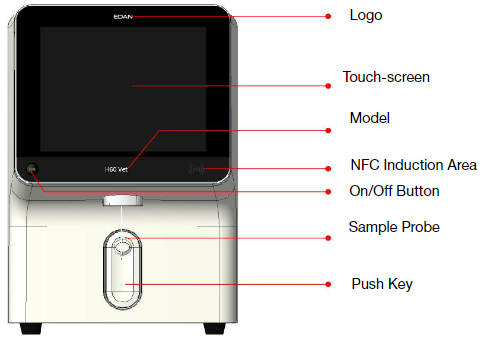
Touch Screen : The analyzer deliveries the information to operators via the touch-screen. It provides the analyzer’s operating screen, sample analysis results, database information, system information and prompt information. The touch-screen is a man-machine interface, through which you can conduct tests, enter information, view test results, etc.
On/Off Button : On/Off Button is used to turn on/off the analyzer.
On/Off Button is Used to Turn on/off the Analyzer : If the analyzer is at the “Working” status, the sample probe will move to the sampling position by default; when the analyzer is going into sleep, the sample probe will move to RBC bath to soak and move back to the sampling position after the analyzer exits from sleep.
NFC Induction Area : NFC Induction Area refers to the lower-right of the display. You can swipe the reagent card on this area to replace reagents card. Please close the reagent cared tightly to the NFC induction area to achieve the best scanning effect.
Communication Ports : There are 5 USB ports and 1 LAN interface at the back of the analyzer. The devices that can be connected to the analyzer via USB ports include:
- External Printer
- Barcode Scanner
- USB Flash Disk
- Mouse
- Keyboard
Rating
There are no comments for now.
to be the first to leave a comment.